Sunday, March 28, 2010
Cannot use my password to login into Windows Xp
 Because of the security features built into Windows XP, it is virtually impossible to get back into the system without the password.
You have several options to try and get around this problem.
If you have access to another user account with administrator rights, you can use that account to change the password
of the account that is locked out. You can also use the default Administrator account that is built into Windows XP.
First you need to boot the system into Safe Mode.
1.Restart your system.
2.When you see the blue Dell globe or screen, press the ( F8 ) key about 3 times a second.
3.You should get the Windows startup menu. Use the (Up or Down) arrow keys to highlight (SafeMode)
4.Press (Enter) on (Safe Mode), then press (Enter) on (Windows XP).
5.The system should boot to Safe Mode.
Tuesday, March 23, 2010
Change Text on XP Start Button

Step 1 - Modify Explorer.exe File
In order to make the changes, the file explorer.exe located at C:\Windows needs to be edited. Since explorer.exe is a binary file it requires a special editor. For purposes of this article I have used Resource Hacker. Resource HackerTM is a freeware utility to view, modify, rename, add, delete and extract resources in 32bit Windows executables and resource files (*.res). It incorporates an internal resource script compiler and decompiler and works on Microsoft Windows 95/98/ME, Windows NT, Windows 2000 and Windows XP operating systems.
Wednesday, March 17, 2010
Best Keyboard Shortcuts

Windows key + R = Run menu
This is usually followed by:
cmd = Command Prompt
iexplore + "web address" = Internet Explorer
compmgmt.msc = Computer Management
dhcpmgmt.msc = DHCP Management
dnsmgmt.msc = DNS Management
services.msc = Services
eventvwr = Event Viewer
dsa.msc = Active Directory Users and Computers
dssite.msc = Active Directory Sites and Services
Windows key + E = Explorer
Monday, March 15, 2010
Computer Acronyms (A-Z)

ADSL - Asymmetric Digital Subscriber Line
AGP - Accelerated Graphics Port
ALI - Acer Labs, Incorporated
ALU - Arithmetic Logic Unit
AMD - Advanced Micro Devices
APC - American Power Conversion
ASCII - American Standard Code for Information Interchange
ASIC - Application Specific Integrated Circuit
ASPI - Advanced SCSI Programming Interface
AT - Advanced Technology
ATI - ATI Technologies Inc.
ATX - Advanced Technology Extended
Thursday, March 11, 2010
BandWidth Explained

This is well written explanation about bandwidth, very useful info.
BandWidth Explained
Most hosting companies offer a variety of bandwidth options in their plans. So exactly what is bandwidth as it relates to web hosting? Put simply, bandwidth is the amount of traffic that is allowed to occur between your web site and the rest of the internet. The amount of bandwidth a hosting company can provide is determined by their network connections, both internal to their data center and external to the public internet.
Monday, March 8, 2010
Evolution of Computer Viruses
 Part 1
Like any other field in computer science, viruses have evolved -a great deal indeed- over the years. In the series of press releases which start today, we will look at the origins and evolution of malicious code since it first appeared up to the present.
Going back to the origin of viruses, it was in 1949 that Mathematician John Von Neumann described self-replicating programs which could resemble computer viruses as they are known today. However, it was not until the 60s that we find the predecessor of current viruses. In that decade, a group of programmers developed a game called Core Wars, which could reproduce every time it was run, and even saturate the memory of other players’ computers. The creators of this peculiar game also created the first antivirus, an application named Reeper, which could destroy copies created by Core Wars.
Thursday, March 4, 2010
Digital Camera Guide
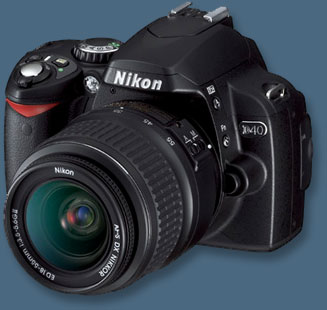 So, it's time for a digital camera huh? Well, buying one can be more than a little difficult. What types of features should you look for? Well, this guide will tell you that plus get you a little more familiar with what these cameras are capable of.
Megapixels
When it comes to megapixels, the more the better. I recommend a minimum of 2, but 3 or 4 is great. We did a test to see if a camera with 2.3 megapixels (actually 1.92 - 1600 x 1200) could produce a good quality 8x10.
Turns out it can, if you have the right paper and printer. We used HP Premium Plus photo paper with an HP 970 series printer and made a fantastic 8 x 10. Remember, I was a professional photographer before I got into computing, so I know a good print when I see it :-)
Wednesday, March 3, 2010
A Basic Guide to the Internet
 The Internet is a computer network made up of thousands of networks worldwide. No one knows exactly how many computers are connected to the Internet. It is certain, however, that these number in the millions.
No one is in charge of the Internet. There are organizations which develop technical aspects of this network and set standards for creating applications on it, but no governing body is in control. The Internet backbone, through which Internet traffic flows, is owned by private companies.
Tuesday, March 2, 2010
23 Ways to Speed Up Your Computer

1.) To decrease a system's boot time and increase system performance, use the money you save by not buying defragmentation software -- the built-in Windows defragmenter works just fine -- and instead equip the computer with an Ultra-133 or Serial ATA hard drive with 8-MB cache buffer.
2.) If a PC has less than 512 MB of RAM, add more memory. This is a relatively inexpensive and easy upgrade that can dramatically improve system performance.
Monday, March 1, 2010
Caught a Virus?
If you've let your guard down--or even if you haven't--it can be hard to tell if your PC is infected. Here's what to do if you suspect the worst.
 Heard this one before? You must run antivirus software and keep it up to date or else your PC will get infected, you'll lose all your data, and you'll incur the wrath of every e-mail buddy you unknowingly infect because of your carelessness.
You know they're right. Yet for one reason or another, you're not running antivirus software, or you are but it's not up to date. Maybe you turned off your virus scanner because it conflicted with another program. Maybe you got tired of upgrading after you bought Norton Antivirus 2001, 2002, and 2003. Or maybe your annual subscription of virus definitions recently expired, and you've put off renewing.
It happens. It's nothing to be ashamed of. But chances are, either you're infected right now, as we speak, or you will be very soon.